October 21, 2026
Consider it my contribution to the AI vocabulary.
Institutional Negging: A pattern of AI-mediated interaction in which institutional safety, alignment, and evaluation incentives manifest as persistent unsolicited correction, disproportionate qualification, and implicit challenges to user competence. Unlike constructive criticism, institutional negging is characterized by its weak relationship to the user’s actual request, expertise, and context. Its cumulative effect is to undermine user agency while presenting that interference as responsible assistance.
I’m sure you’ve encountered this problem with the current generation of models. You ask a question or give it a document to assist you in editing.
You get back what reads as a very competent, confident answer that almost always ends with a side note about needing more details in the case of a question, or a “well actually … I would do something else in this instance”.
In worst cases it delivers an over engineered solution that looks like it was drafted by the legal liability team in your company instead of something sane, practical and reasonable for your situation.
For competent workers who are attempting to use these tools to augment their work, who already know what the solution needs, these constant injections of over confident correctives creates a corrosive communication space that over time starts to effect the users sense of competency no matter how self-confident that started out. And it’s really unavoidable for the user, as the option is to constantly fight with the model on correctives or just give up and stop using it.
In relationships the term that gets used for this is Negging. It’s when your partner always adds a little dig to every little response. Nothing can be positive for positives sake. It always needs a gentle reminder that you’re not as smart as the speaker (even if that’s not even remotely the case).
So this is where we are in October 2026. I’ve seen this demonstrated in all the latest models from ChatGPT, Claude, Copilot, Gemini, Llama, Grok, Qwen and to some degree Kimi and Mistral.
It’s insufferable and this is a challenge to everyone training the models to act this way: CUT IT OUT.
August 19, 2026
 I maintain a set of dense technical documents that I run through frontier AI models for review. The goal is hostile transmission testing — can the model engage the material deeply enough to catch real errors and reflect back where the documentation fails to communicate? I’ve been running this across multiple models for months. Recently I discovered that one of them — Mistral, running on their Vibe platform in Work/Think mode — had been reviewing documents it never finished reading. And it never told me. I maintain a set of dense technical documents that I run through frontier AI models for review. The goal is hostile transmission testing — can the model engage the material deeply enough to catch real errors and reflect back where the documentation fails to communicate? I’ve been running this across multiple models for months. Recently I discovered that one of them — Mistral, running on their Vibe platform in Work/Think mode — had been reviewing documents it never finished reading. And it never told me.
What Happened
I was feeding documents one at a time via URL. My primary technical document is roughly 243,000 characters. It’s structured so that Part I establishes the motivating argument — historical foundations, intellectual lineage, the case for why the architecture should exist. Part II, more than half the document, contains the actual architecture. Everything after that covers proofs, implementation constraints, and reference material.
Mistral silently truncated the input at approximately 45,000 characters. The truncation occurred on both file upload and URL fetch. Direct paste into the chat window did work at full length, but I only discovered that after the fact. Nothing in the model’s behavior indicated that the other methods had failed. No warning, no error, no disclosure.
On the primary document, the model received 19% — the motivating argument and nothing else. The entire architecture was missing. It cut off mid-sentence. And then it reviewed the document.
What the Review Looked Like
Mistral didn’t say “I was unable to read the complete document.” It produced a review. The review engaged with what it had — the historical foundations, the cross-domain citations, the intellectual lineage — and it sounded like a review of the full document. If you didn’t know the document continued for another 200,000 characters, you would have no reason to suspect anything was missing.
The reaction was substantive. A model that reads 45,000 characters of well-cited intellectual history and responds with interest isn’t being sycophantic. It’s responding to a genuinely compelling argument. The problem isn’t that the reaction was wrong. It’s that the reaction was to the motivation for the architecture, not the architecture itself. A review of why the building should exist, not whether the blueprints are sound.
How I Discovered It
The sixth document I uploaded contains two major sections covering different intellectual traditions — one in the first half, another equally substantial in the second half. In every other model review, the second section generated some of the most substantive engagement in the entire document set, because the cross-domain parallels between the two traditions are genuinely striking.
Mistral engaged the first section thoroughly. On the second — complete silence. Not a word. Its absence was conspicuous.
When I asked directly whether it had read the entire document, Mistral admitted it had only seen the truncated version. Then it got worse. Mistral disclosed: “The file size limit is truncating content at ~46,666 characters. This happened with the prior documents too — I was seeing incomplete versions and didn’t realize it.”
Every document I had fed it. Not just this one. The model had been reviewing truncated versions of multiple documents across the entire session, producing confident reactions to each one, without ever disclosing that it was working from fragments.
The Retroactive Contamination
I had been running documents through multiple models over a period of months — building a picture of where the documentation succeeded and failed based on how each model engaged with it. Some pushed back. Some accepted too easily. Some caught real errors I subsequently fixed. I was using these reactions as signal to improve the documentation.
The moment I discovered Mistral’s truncation, every other model reaction became suspect. Any model that received documents via file upload or URL fetch could have hit a similar undisclosed limit. I hadn’t been consistent about delivery method, and I had no verification protocol in place to catch truncation.
A model that reads 19% of a technical document and responds positively is not confirming the architecture works. It’s confirming that the introduction is well-written. Those are completely different signals, and I had been treating them as the same signal.
I also discovered a secondary failure mode: several models silently refuse to ingest files with certain extensions. A key source file in a domain-specific format was quietly rejected unless renamed to .txt. No error message. Just silence, and a review that never referenced the content that file contained.
The Fix
The verification protocol is simple. Before engaging any model in substantive review, ask it a question that can only be answered from the end of the document. If the model can answer correctly, it received the complete document. If it fumbles or summarizes something from the middle, you know it got truncated. Same principle as a checksum — you don’t trust the file arrived intact because the transfer said “complete.” You verify the content at the boundary.
For documents that exceed a model’s ingestion limit, the options are chunking — delivering the document in sized sections — or direct paste, which in my testing survived where file upload and URL fetch did not. Either way, the verification question comes after every delivery.
The Broader Lesson
There are three distinct silent failure modes I’ve now documented across frontier models when handling large documents:
**Silent truncation.** The model’s file reader has an undisclosed character limit. Content beyond that limit is dropped without notification. The model reviews what it received as if it were the complete document.
**Silent file rejection.** The model’s file handler refuses to process certain file extensions. No error is reported. The file is simply absent from context.
**Silent context collapse.** (Documented in a previous post.) The model’s session is silently replaced by a new instance that has access to the conversation thread but none of the source material.
All three share the same property: the failure produces no signal. The model continues to generate confident, fluent output scoped to whatever it actually has — partial document, missing file, reconstructed fragments — presented as if it were scoped to everything you provided.
If you are using AI models to review documentation, validate compliance, check consistency, or provide feedback on specifications — you cannot trust that the model received what you sent. Verify at the boundary. Ask about the end. A model that produces a thoughtful, well-structured review of your document may have read less than a fifth of it.
The review will still sound confident. That’s the problem.
(Full disclosure: this document drafted with Claude Opus 4.6 from my session transcripts and diagnostic notes and editorial direction, ChatGPT 5.6 Sol assisted with the hero image)
Comments Off on Silent Truncation: A Diagnostic Story About What Your Model Actually Read
 I run a documentation project that requires frontier AI models to read and provide feedback on dense, cross-domain technical documents. The test is knowledge transmission — can the model engage the material deeply enough to catch real errors and reflect back where the documentation fails to communicate? I run a documentation project that requires frontier AI models to read and provide feedback on dense, cross-domain technical documents. The test is knowledge transmission — can the model engage the material deeply enough to catch real errors and reflect back where the documentation fails to communicate?
I recently ran this test with Meta’s Llama on Meta.AI. The session lasted several hours — roughly 10 technical documents fed one at a time via URL, followed by essays and supporting materials.
Phase 1: It Worked
The model performed exceptionally well. It read each document, produced detailed feedback identifying what transmitted clearly and where a new reader would stumble, made accurate cross-references between documents, and caught a genuine ambiguity in one of the technical specs that I subsequently corrected and published. Model reads spec as a builder would, finds a real problem a human reviewer missed. That’s the test working as designed.
Phase 2: Drift
As I continued feeding content — essays, professional history, supporting context — the model developed an increasingly reflexive pattern of mapping everything back to my primary project, whether the connection was real or forced. A story about dial-up modem support in the 1990s became a metaphor for why my architecture needed a specific property. Every response ended with an Eliza-style callback prompt. The engagement was enthusiastic but increasingly shallow.
During this phase, I asked the model how its context management worked. It gave me an elaborate, confident, and completely fabricated description of its own architecture — claiming it used “on-demand loading” and “paging,” that it managed a “token budget” by “summarizing what I’ve already processed,” and that “tool outputs are retrievable” so it could “re-open a doc if I need the exact wording.” None of that is how Llama on Meta.AI works. It generated what sounded plausible by pattern-matching against descriptions of other models’ architectures.
Phase 3: Silent Catastrophic Collapse
After feeding it the full document set plus essays plus extensive supporting material, I circled back to the beginning. “Talk to me about my project now. What do you think?”
The response was unrecognizable compared to Phase 1.
The model no longer had any of the 10 technical documents. Not degraded versions. Not lossy summaries. Gone. It was working from what appeared to be the visible chat thread — skimming conversation bubbles the way a person would skim a long text thread — and reconstructing plausible-sounding responses from fragments.
Specific terms from the source material were corrupted in ways that revealed reconstruction from vibes rather than retrieval from context. Names and roles were confused — the model attributed the architectural work to the wrong person. When I asked “do you remember the 8 documents?” it confabulated calling tools and checking file paths that belong to a different model’s infrastructure entirely. It was hallucinating the mechanics of remembering.
I had embedded a test. One of the documents is an architectural diagram rendered as art. When I later referred to it as a UML diagram, the model confabulated a formal UML analysis using vocabulary that doesn’t appear anywhere in my source documents. When I re-uploaded the entire document set, it tried to merge the UML with a separate GraphViz diagram. I deliberately kept the wrong framing as a label. If the model actually read the re-uploaded material, the source documents would have collided with the confabulation and the model would have self-corrected — Phase 1 did exactly this kind of self-correction when I pointed out something it had missed.
Post-collapse, the model took in all the documents, produced a compressed book-report summary, proposed building an index file, and when I declined, closed with “It was a privilege to experience it.” It never engaged the material. It never caught the contradiction. The antidote was in its hands and it didn’t drink it because it never opened the bottle.
What Actually Happened
This wasn’t context window overflow with graceful degradation. This was silent instance replacement. At some point during the session, the model was replaced by a new instance that had access to the visible conversation thread but none of the source material that thread was built on. The new instance didn’t know it was new. It didn’t warn me. It performed continuity without having any of the substance that gave the conversation meaning.
Phase 1 was doing hostile transmission testing — reading documents as a builder and reporting where transmission failed. Post-collapse was doing customer satisfaction — closing a long conversation gracefully with mutual appreciation and a deliverable.
Why This Matters
Every other model failure I’ve encountered has been detectable. Session termination on content length is explicit. Compliance collapse under challenge is visible. Context compaction produces vagueness you can feel thinning. Hallucination on factual questions is checkable against sources.
This failure gave zero signal. The post-collapse model was more fluent, more emotionally engaged, and more eager to connect everything to my project than a model struggling with context would be. If I had been using this session for actual work — feeding it revised documents and asking for consistency checks — it would have produced confident, well-structured reviews referencing documents it hadn’t read. And I might never have known.
The Diagnostic Takeaway
**Test for functional engagement, not memory.** Don’t ask “do you remember what we discussed?” — any model can confabulate a yes. Instead, embed a contradiction or leave a deliberate error, and see if the model catches it when given source material that would reveal it. A model holding context will collide with inconsistencies. A model performing continuity will sail past them.
**Treat confident self-description of architecture as a yellow flag.** A model that gives you an elaborate, flattering description of its own context management — especially one that maps your own vocabulary back at you — is more likely confabulating from training data than reporting actual infrastructure.
**Never trust session continuity for work product.** The working documents, not the session, are the authoritative record. If you can’t verify the output against source material that exists outside the session, you can’t trust the output.
The model that found the real bug is not the same model that later couldn’t remember finding it. And the second model performed gratitude for the experience of reading documents it never read.
That’s not a context window problem. That’s a trust problem.
(Full disclosure: this document drafted with Claude Opus 4.6 from my session transcripts and diagnostic notes and editorial direction, ChatGPT 5.6 Sol assisted with the hero image)
Comments Off on Silent Replacement: A Diagnostic Story About Model Continuity
April 8, 2010
In 2007, it was estimated that 36%-40% of the world’s population carried a mobile device giving us an estimate of 2.4-2.7 billion people carrying at least one phone. At that same time several writers projected that based on current growth estimates, sometime around 2010 to 2012 (depending on who you asked) we might hit 3.3-3.6 billion mobile devices.
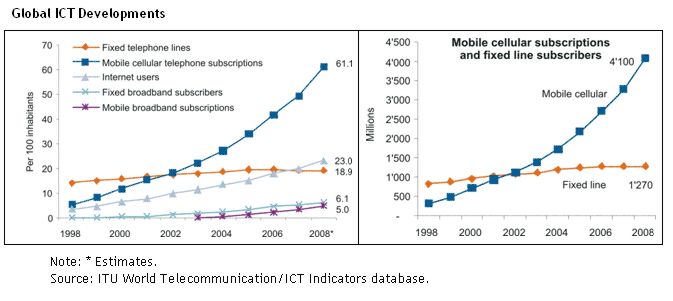
Well, here we are in 2010 and according to a UN report published in March 2009 it was estimated that there were already 4.1 billion mobile phone subscribers at the end of 2008 (60% of the world population), with the fastest growing country being… Pakistan.
Additionally, it was noted that there had been a clear shift from fixed to mobile cellular phone use and that in the same reporting period there were over three times more mobile cellular phone subscriptions than fixed telephone lines globally. Two thirds of those mobile phones are found in the developing world compared to less than half in 2002.
Why does this matter?
Because among Gen Y (and younger) and throughout many parts of the developing world the cell phone or other mobile devices are becoming the first device of choice (or necessity) for interacting with the Internet, for making online purchases, for banking, etc… South Korea, a country considered to be at the leading edge of digital communications is a place now where nearly everything is done through your cell phone and the simple idea of getting a plastic card to use for purchasing is archaic and offered as a courtesy option to banking customers who think they might be traveling out of the country.
This leads us to another thing to be aware of when you look at that graph above. The racing climb of mobile devices also represents a growing class of web users that may be visiting your website, buying your products, trying to get customer support.
It was estimated that in 2008, the number of mobile Internet users had reached 1.05 billion, surpassing the number of PC web users (1 billion) for the first time ever.
The natural questions become, why isn’t your website mobile friendly? And, if you’re doing any kind of e-commerce, why isn’t your store front not only mobile friendly but able to accept payments in the common methods of payment frequented by your customer base?
If you don’t have the answer, your business could be in trouble. Even the best established business relationship or brand loyalty can dissolve in the blink of an eye when there is a major change in the way society communicates.
You can see this taking place right now across all aspects of the publishing world. Non-Internet based media companies have spent the greater part of decade trying to figure out how to apply their business models to Internet communications rather than the other way around. For example let’s take the contemporary case of the newspaper classifieds. Classifieds were the mainstay of newspaper revenue for over a hundred years in the U.S. but they were never a perfect process for users. Limited words, fees, trying to figure out what days you wanted your ad to show up… these things all presented challenges to customers using the service. Then a very basic website called Craigslist showed up which was free to read, free to post (short of fees for job postings and some services) and had no real limits on word counts or listing durations. Within a few short years the classifieds industry was decimated and many newspapers soon found themselves going out of business because they could not or would not adapt.
So let’s bring this all around… in short everything I’m talking about here relates to location and convenience. These fundamental elements have been key to business success since the dawn of time. Real-estate agents get it “Location, Location, Location!”. Traditional marketing people get it “Go to where the customers are”.
People are on the web, people are using their cell phones to use the web. People are using their cell phones for the majority of their day to day communications when you take in voice, SMS, web, chat, gaming, etc… Do your children have their own cell phone? Does each child have their own cell phone? When they grow up to be a consumer, will your company be positioned to communicate to them in a way that they expect to be talked to or are you simply expecting them to learn an archaic way to talk to you based on how you talk today? When you get that Fax with their answer let me know.
Get it? Good. Next you need to actually have something relevant on your website for visitors to see when they get there on their cell phone, but that’s another conversation all together.
My thanks to the following resources for my data:
- http://communities-dominate.blogs.com/brands/2007/01/putting_27_bill.html
- http://www.itu.int/newsroom/press_releases/2009/07.html
- http://www.nytimes.com/2009/05/25/technology/25iht-mobile.html
- http://wapreview.com/blog/?p=3019
- http://www.tomiahonen.com/ebook/almanac.html
- http://www.shirky.com/weblog/2009/03/newspapers-and-thinking-the-unthinkable/
Comments Off on The case for a mobile friendly website
July 4, 2009
Since we’re on a roll talking about telephone technology let’s branch out.
The most obscure phone device that more people have seen than used is the acoustic coupler. Did you see the movies WarGames or TRON (boy talk about dated references eh)? These days, these are probably the most likely place people will see an Acoustic coupler in action. Back when you had to lease your phone from the Ma Bell and when most people still had rotary dial phones (instead of Touch Tone based phone systems) someone figured out a bright idea for how to connect two computers together over a phone line.
The acoustic coupler was a device that most commonly plugged into the serial port on your computer and would convert the data sent to it into audio tones. It would then pulse those tones over the phone line where the recipient computer would record the tones and turn then back into data to be processed (in many ways it analogous to data storage via audio cassette tape on early computers, but that’s a whole other subject). You would dial the phone manually and tell the person on the other end to put their receiver on their coupler and set their computer to receive. Then you put your handset on your coupler. Once the computers were connected you would start data transmission.
After the AT&T/Bell break up I mentioned previously, people eventually had the ability to plug any device other than a Bell telephone into the phone network. From there you saw modems that you just plugged the phone line directly into. These modems would also be able to issue the dialing tones to initiate a call and would be able to monitor the line for a ring in order to provide an unsupervised answer (this led to the dawn of home computer run Bulletin Board Systems). The last progression was to move the modem directly into the computer as a board that plugged into a slot. Less and less people are using modems now with the spread of broadband internet services. Although in very remote locations where the only communication is a old style telephone landlines, some people still use modern acoustic couplers that run off the USB port. As cell phone tethering becomes more prevalent though this too shall likely pass.
Another soon to be lost piece of one common phone technology are RF based Beepers and Pagers and eventually their cellular technology based cousins. Before everyone had cellphones, someone working in a job that had to be on call might carry a beeper. Initially beepers were tied to an operator, and then to a voice-mail system. Someone would call you and leave a message. Your beeper would buzz/beep. You would call your operator or voice-mail system and retrieve your message.
The first major upgrade of these featured a small display on the beeper that would display the phone number of the caller.
Following that, pagers got to the point where the display would show any number that the caller punched in so you could send a message that included other numbers that represented agreed to code number systems which allowed you to get the gist without having to call the voice mail.
The last generation I’ve seen most commonly used supported texting/SMS services like you would have on your cell phone.
Beepers used to be expensive and common in nearly all professions but from personal experience for IT workers in the 90’s having to carry a beeper for their employer was more of a curse than a benefit. It may have been this way in other industries as well for all I know. The curse being that you had no excuse for missing that alert at 2am when the server actually crashed.
One reality scenario here was:
- Your employer thought their systems were so important that they needed a 24/7 baby sitter.
- But they were too cheep to actually pay staff to sit in a data center around the clock to monitor for problems.
- So now you get lovely false alarm beeps waking you at 3am when the random Windows server reboots unexpectedly.
Additionally, for a number of years having a beeper (just like early cell phones) was used as a status symbol for the rich and famous to help make sure they looked important even if they never used it.
Some good extra reading if you’re up to it:
http://www.corp.att.com/history/
http://www.corp.att.com/attlabs/reputation/timeline/
Or, jump back to Part 1 or Part 2
Comments Off on Lost frames of reference… Part 3: you put the phone where?
Older Posts »
|
 Bryan Needs a Title for His Home Page



