September 23, 2026
There’s a difference between managing a problem and solving it.
On a recent gig, I watched a support team chase the same category of ticket for weeks, drive space alerts on machines with 128–256GB system drives. The standard fix was to log in, clean temp files, move user data to network shares, and close the ticket. Rinse repeat. Daily ticket volume drove a quick resolution then move on.
At the management level where only the ticket class was seen there were comments of better education to the users on how to manage their data or to tell them not to keep so much work on their devices. There were also talks about larger drives or increased VM allocations. All of these are reasonable options to consider.
I looked at a handful of these systems myself and found an incorrect page file configuration in the standard deployment image. It was consuming up to 40% of the drive before the user even started working. On one system with a 128GB drive, the page file allocation alone was 96GB. Three quarters of the drive, before accounting for Windows, applications, or user data. Every machine deployed from that image inherited the problem.
In this case, one configuration fix addressed the source of the recurring tickets and freed up support time. No new hardware. No budget request.
The team handling this was working hard to help. Their cleanup work gave users enough room to get back to work. But every ticket treated as an isolated incident was another opportunity for the underlying problem to keep going. When the queue stays full, making room to investigate a pattern can be difficult. Yet that’s often where the biggest return is: asking why the same work keeps needing to be done.
A drive space alert that seemed like a generic user problem turned into a higher level technical problem, and when repeated across a fleet, it suddenly becomes a problem where you can calculate lost employee time, support overhead, and potentially an unnecessary hardware expense if resolved incorrectly.
That’s the connection I look for when I’m helping someone, and it’s been the pattern across my career. Get close enough to the systems (technical and human) to understand what’s actually happening, then connect the finding to what it’s costing the business and help deliver a solution to close the loop.
A career of work in infrastructure and technology leadership, and I still look under the hood.
September 21, 2026
I configured my server by the book. Ten AI models still couldn’t read my documents.
I set up a technical documentation bundle: eight markdown files, a PDF, a diagram source, and an llms.txt manifest with absolute URLs, token estimates, and a reading order. Correct MIME types. Validated headers. Clean UTF-8. Every URL resolves.
Then I asked ten commercial AI models, including frontier-class, to fetch the manifest and read the documents. Same server, same files, same day and none of them succeeded cleanly. Believe it or not, this was a step up from having them ingest from an HTML landing page with direct file links!
But, two couldn’t reach the server at all (blocked by their own infrastructure, not mine, although they both blamed my server). Two rejected every markdown file because their fetchers don’t accept text/markdown. The correct configuration makes content less accessible than serving the wrong type.
Four silently truncated the largest document. One stopped at 32 KB (13%). Another at 120K characters (49%). None knew they had partial copies with one exception: Claude Opus 5.1 (High) told me its parser only retained the first and last thirds of my document and asked me to resubmit. That’s the behavior I want to see but doesn’t help much in an unattended mode.
Four served cached versions despite headers requiring revalidation. Three models returned three different stale versions of the same file on the same day. Every one blamed my server. There was definitely a trend to blame me or my infrastructure when things failed and I’m not pleased with that. Either the models don’t have full visibility to their failure modes or they’re just hallucinating. The latter is probably the more dangerous though.
One decoded UTF-8 as Latin-1. Every diacritic destroyed. Not critical but still irritating. I’ve fixed that on my server to enforce decoding in the future.
One fabricated a finding… reported a file that doesn’t exist, cited footers that don’t reference it, and presented invented observations alongside real ones at identical confidence. This set off a scramble to figure out if a stray error had gotten into the text somehow, but it ended up being a confabulation based on a phrasing expanded to imagined content.
The dangerous failures were silent. Truncation, caching, encoding corruption, and fabrication produced no errors. The model answers confidently from whatever it retrieved, and nothing in the output tells you retrieval failed.
The industry sells “give it a URL” as a core capability. For most models on most documents, it isn’t as reliable as opening the link in a browser. And you can’t tell from inside the conversation unless you’re actively probing secondary to whatever it is you’re actually trying to get done.
If you’re building an llms.txt: the format works. The implementations don’t. Plan for rejected MIME types, ignored headers, silent truncation, and stale caches. Verify independently and across models.
February 9, 2014
So, this is a story I don’t tell too often but in light of some recent conversations about performing backups following the news about the Iron Mountain fire, I felt it would be insightful to share.
Back in 1997/1998 I learned a very hard lesson about data loss and the publication I Co-Edited named Game Zero magazine.
First the back story to explain how this situation ended up the way it did.
We started our web presence near the end of 1994 with a user account with a local Arizona company named Primenet who offered users the traditional array of features (WWW, POP mail, etc…). This worked out great except for a couple of problems. The first was that even though we had registered the domain gamezero.com for our site, Primenet’s server name resolution would sometimes flip a visitor’s browser to the primenet.com/team-0 URL while the person was traversing the site. This caused lots of people to create bookmarks and links to the site by the wrong URL (this comes into play later).
The second and later problem, although not a technical issue, was the cost associated with bandwidth for WWW visitors to the site. Towards the end of our time with Primenet we were hitting fees of a few hundred dollars a month for bandwidth from our 700,000+ page views a month. Fortunately we had designed our site incredibly light, so that helped keep costs low, but traffic and fees were climbing. Ultimately I set my sights to moving us to new “discount” hosting services which were becoming a thing in 1997. It was obvious we could save a significant amount of money by moving the site.
For backups, we had our production computer which housed all the original and developing web content, including the active mirror of the website and remote publishing tools as well as our POP e-mail client for all business e-mail. Additionally, we kept backups of web content and e-mails on a collection of Zip disks along with some limited content on a random assortment of floppies.
In 1997 hard drives where expensive! We’re talking a few hundred dollars for a 1GB drive. Our production PC had something like a 120MB drive, as I recall, so we had lots of data off loaded on the Zip disks.
Also around this time we also received word that the provider which had been handling our FTP based video repository was getting out of the hosting business. I decided it best to roll the video content into the new web hosting arrangement as the price would still be reasonable. We quickly migrated everything over, changed DNS entries, started sending out e-mails to people who had the old primenet.com addresses to please update their links, etc… Following the migration we only published a few major updates on the new server consisting of a couple of new videos and some articles which only existed on the website, our production system and our Zip drive backups.
Then problems started…
- Traffic tanked on the new server.
- My crawling the web looking for bad links suddenly made me aware of just how bad the extent of the linking issue was and a significant amount of traffic was still going to the old Primenet URL. Fortunately right before we closed our Primenet account we setup a root page that linked to the proper URL along with a notice about the move which Primenet was kind enough to leave up at no cost, but it wasn’t a full site wide redirect though. Just the root pages.
- A few months into running on the new provider their servers went dark. When I contacted them to find out what happened, I reached a voicemail that informed me that they had filed bankruptcy and closed business. Done, gone… No contact and no way to recover any of the data from the web server.
- We now had a domain name that didn’t respond, our old provider’s server was pointing traffic to that very same dead URL and since we had long since closed the Primenet account we had no ability to log in and change the redirect notice or make other modifications to redirect traffic someplace else.
- While scrambling to find new hosting, the hard drive on our production computer completely and utterly failed. 100% data loss.
- After getting a new hard drive I went to start rebuilding from our Zip disks and to my horror none of them would read. We had now become a victim of what became to be known as the “click of death”. We lost some 20-30 Zip disks in total. Almost everything was gone except for a mirror of the website from before the migration to the new hosting and other random items scattered around. We also had a limited number of hard copies of e-mails and other documents.
- Lastly, while the Internet Archive now is a great way to recover website content. At this point in time it was still just getting started and their “Wayback Machine” had only just taken a partial snapshot of our sites (in both the US and Italy). Par for this story, the lost content was pages that had not been crawled yet except for the index pages for the missing videos. I could view the archive of the video pages… but the linked videos were too large at that time and were not mirrored.
Coming into this, I felt we had a pretty good data backup arrangement. But I learned the hard way that it wasn’t good enough. We lost all of the magazine’s e-mail archives including thousands of XBand correspondences as well as innumerable e-mails with publishers and developers. We lost two videos that had been produced and published. We lost a few articles and reviews. We also lost nearly all of the “in progress” content as well as a number of interviews.
At this point the staff agreed to stop spending money on the publication and formally end the magazine, especially since some of them were already making natural transitions into their careers and school. While we had stopped actively publishing at then end of 1996/start of 1997, if you were to ask me if there was a hard line for the the true end of the magazine, this was it.
Ultimately I did get the site back up as an archive which you can still read today. But, that’s another story.
The lesson of this story is to remember that there is no fool-proof backup situation. Only you can be responsible for you (or your company’s) data and you must always be aware that no matter what your best efforts are, data loss is always a possibility.
99.9% guarantees are great except for that 0.1% chance, which is still a chance! and if someone is selling you a 100% guarantee let me know because I’ve got the title for this bridge in Brooklyn I might consider selling you for a deal.
What could I have done differently?
- Spread out our backups across more than one media type and one location. Simply having a duplicate set of Zip disks and a second drive off site where there was no cross-mixing would have made a huge difference here.
- More frequent backups of critical business data such as e-mail.
- Retained the master account with the old service provider until we were sure traffic migration had been completed.
- Upon the first sign of Click of Death observed. I should have isolated both the problematic media and drive from use and looked for a second drive as the damage propagated once manifest but nobody had enough information about the problem at the time and the manufacture kept denying the problem existed.
Granted some of these would have likely added overhead cost, but the the question is would that cost balance against the value of the data lost? I don’t know. But since this happened I have been far more diligent in my data storage strategies where I now factor in the value and importance of the data with the breadth and depth of the backup plan and go with the best possible solution I can devise.
I have had only one significant data loss in the years since this happened. It was just last fall and I was doing some data re-organization as part of a desktop upgrade. A USB drive I was using for temporary storage fell over and become damaged in such a way that it would no longer read the disk. I then discovered that the data on the drive hadn’t been synchronized with the backup repository for a couple of months for some reason. Fortunately it was non-critical, personal data (downloaded drivers and install packages that I was able to re-download from the Internet). So all in all the only loss here was in my time. But it was a reminder to me that even though I am way more careful than before, accidents can still happen.
Comments Off on Single point of failure (or how important is your data?)
April 8, 2010
In 2007, it was estimated that 36%-40% of the world’s population carried a mobile device giving us an estimate of 2.4-2.7 billion people carrying at least one phone. At that same time several writers projected that based on current growth estimates, sometime around 2010 to 2012 (depending on who you asked) we might hit 3.3-3.6 billion mobile devices.
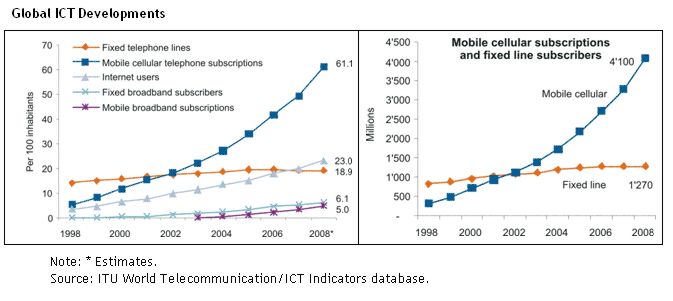
Well, here we are in 2010 and according to a UN report published in March 2009 it was estimated that there were already 4.1 billion mobile phone subscribers at the end of 2008 (60% of the world population), with the fastest growing country being… Pakistan.
Additionally, it was noted that there had been a clear shift from fixed to mobile cellular phone use and that in the same reporting period there were over three times more mobile cellular phone subscriptions than fixed telephone lines globally. Two thirds of those mobile phones are found in the developing world compared to less than half in 2002.
Why does this matter?
Because among Gen Y (and younger) and throughout many parts of the developing world the cell phone or other mobile devices are becoming the first device of choice (or necessity) for interacting with the Internet, for making online purchases, for banking, etc… South Korea, a country considered to be at the leading edge of digital communications is a place now where nearly everything is done through your cell phone and the simple idea of getting a plastic card to use for purchasing is archaic and offered as a courtesy option to banking customers who think they might be traveling out of the country.
This leads us to another thing to be aware of when you look at that graph above. The racing climb of mobile devices also represents a growing class of web users that may be visiting your website, buying your products, trying to get customer support.
It was estimated that in 2008, the number of mobile Internet users had reached 1.05 billion, surpassing the number of PC web users (1 billion) for the first time ever.
The natural questions become, why isn’t your website mobile friendly? And, if you’re doing any kind of e-commerce, why isn’t your store front not only mobile friendly but able to accept payments in the common methods of payment frequented by your customer base?
If you don’t have the answer, your business could be in trouble. Even the best established business relationship or brand loyalty can dissolve in the blink of an eye when there is a major change in the way society communicates.
You can see this taking place right now across all aspects of the publishing world. Non-Internet based media companies have spent the greater part of decade trying to figure out how to apply their business models to Internet communications rather than the other way around. For example let’s take the contemporary case of the newspaper classifieds. Classifieds were the mainstay of newspaper revenue for over a hundred years in the U.S. but they were never a perfect process for users. Limited words, fees, trying to figure out what days you wanted your ad to show up… these things all presented challenges to customers using the service. Then a very basic website called Craigslist showed up which was free to read, free to post (short of fees for job postings and some services) and had no real limits on word counts or listing durations. Within a few short years the classifieds industry was decimated and many newspapers soon found themselves going out of business because they could not or would not adapt.
So let’s bring this all around… in short everything I’m talking about here relates to location and convenience. These fundamental elements have been key to business success since the dawn of time. Real-estate agents get it “Location, Location, Location!”. Traditional marketing people get it “Go to where the customers are”.
People are on the web, people are using their cell phones to use the web. People are using their cell phones for the majority of their day to day communications when you take in voice, SMS, web, chat, gaming, etc… Do your children have their own cell phone? Does each child have their own cell phone? When they grow up to be a consumer, will your company be positioned to communicate to them in a way that they expect to be talked to or are you simply expecting them to learn an archaic way to talk to you based on how you talk today? When you get that Fax with their answer let me know.
Get it? Good. Next you need to actually have something relevant on your website for visitors to see when they get there on their cell phone, but that’s another conversation all together.
My thanks to the following resources for my data:
- http://communities-dominate.blogs.com/brands/2007/01/putting_27_bill.html
- http://www.itu.int/newsroom/press_releases/2009/07.html
- http://www.nytimes.com/2009/05/25/technology/25iht-mobile.html
- http://wapreview.com/blog/?p=3019
- http://www.tomiahonen.com/ebook/almanac.html
- http://www.shirky.com/weblog/2009/03/newspapers-and-thinking-the-unthinkable/
Comments Off on The case for a mobile friendly website
June 5, 2009
The only part of Arthur C. Clarke’s “laws” of prediction that anyone ever remembers is:
Any sufficiently advanced technology is indistinguishable from magic.
Sadly for Mr. Clarke most of the people that have heard that quote probably don’t know he said it.
On another note I might add a corollary to that quote:
Any sufficiently advanced technology that works so well that people don’t realize they are using it effectively doesn’t exist.
I said that.
🙁
Comments Off on Advanced tech == magic?
Older Posts »
|
 Bryan Needs a Title for His Home Page



